Smarter Weed Mapping Starts Here: New Capture Tools Released
We’re excited to introduce new spatial capture tools in the latest release of the Chartis Weeds Mobile App, making it even easier for biosecurity teams to map and manage infestations and treatments, directly in the field.
More ways to capture
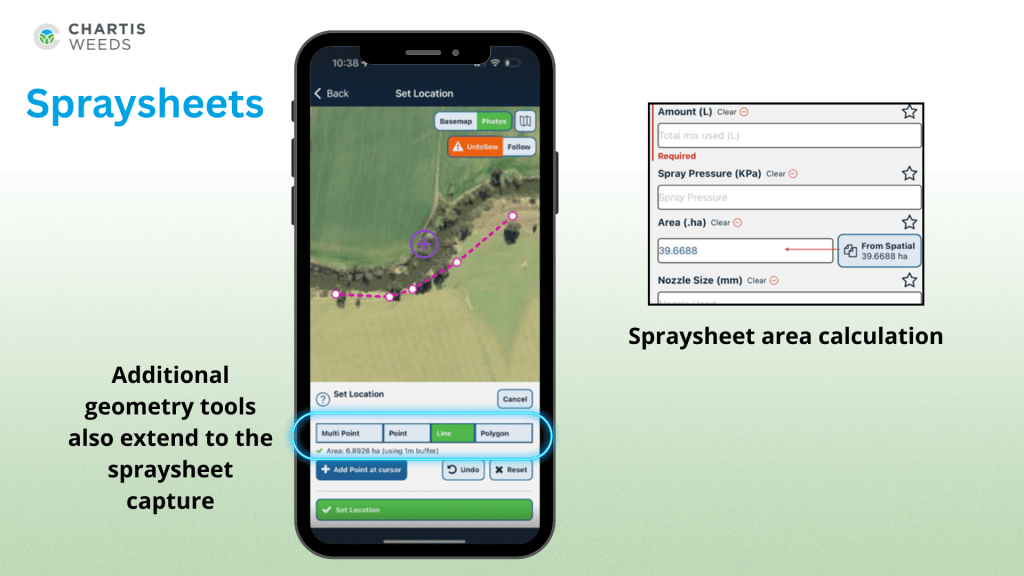
Users can now capture Line, Polygon, and Multipoint features for both Weeds and Spraysheets. This added flexibility allows field teams to accurately record roadside infestations, boundary treatments, and large-scale control zones with greater precision and efficiency.
Designed for field efficiency
This latest update introduces smarter, more efficient ways to record weed infestations in the field. Users can now calculate the Area Infested directly from mapped features—whether that’s a point, line or polygon. A simple new function allows you to populate this value instantly based on the geometry you’ve drawn, eliminating the need for manual entry and ensuring greater accuracy.

The update also supports capturing multiple weed locations within a single inspection. Field teams can now drop several points across a property to represent individual infestations, making it easier to track and visualise the spread of priority weeds over time. This added flexibility improves both the speed and quality of data collected in the field, helping organisations build a more detailed picture of on-ground biosecurity challenges.
Why it matters
These updates help ensure that the data captured in the field is both detailed and spatially accurate, enabling better reporting, analysis, and decision-making. Whether you’re managing large-scale treatment programs or tracking individual infestations, the new tools help you work smarter with fewer delays.
Ready to try it out?
Existing Users: Please visit the App Store or Google Play and download the latest version today! This functionality is only available on version 1.8.3 or higher. Unsure of what version you’re on? Refer to the bottom left on the Chartis Weeds login screen.
For support or to learn more about these features, contact our team.
Comments are closed